
Coviant Software
Diplomat MFT
No Code. Easy to use. Secure File Transfer.
Award-winning Managed File Transfer Software
Secure File Transfer
Best Value
Enterprise-Grade Security

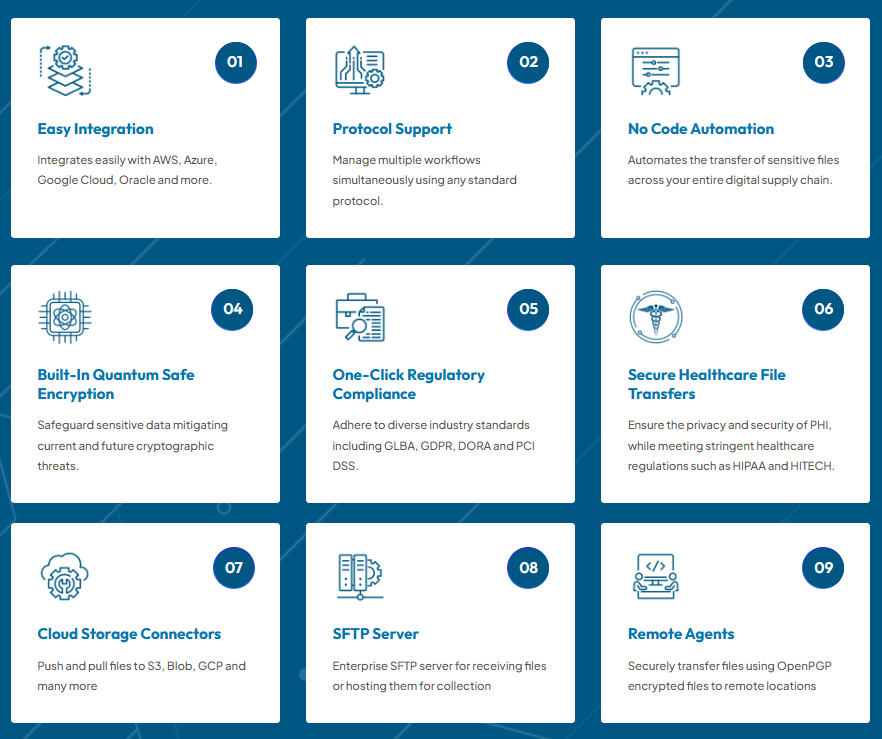

Simple Integration, End-to-End Encryption, and Automated File Transfers.
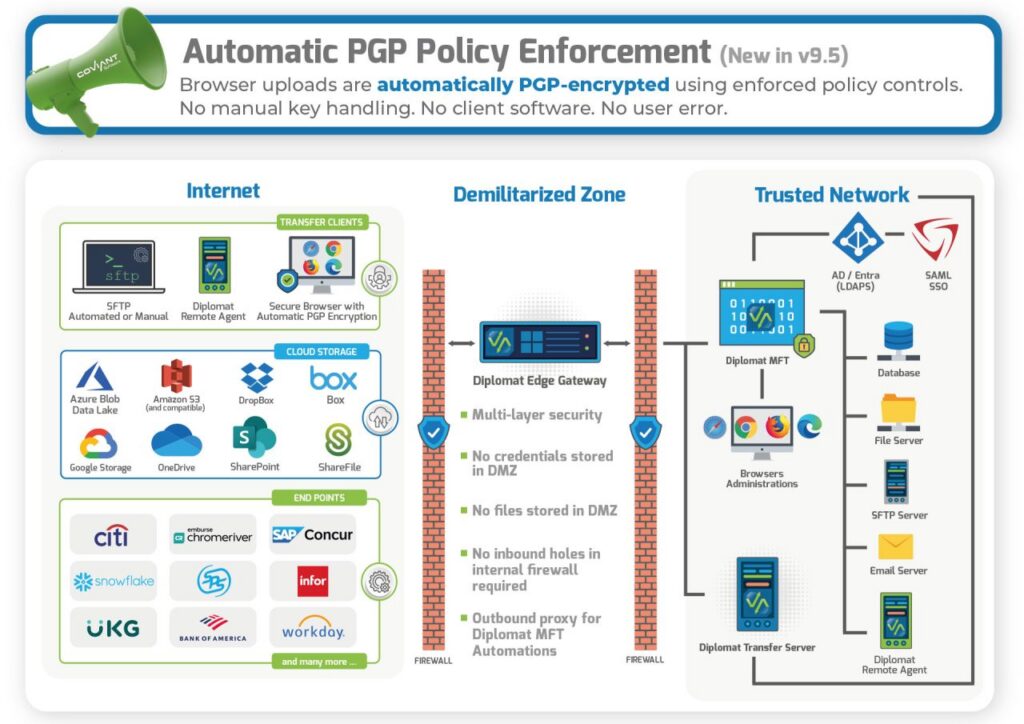
Diplomat MFT is feature rich and designed to address almost any file transfer requirement, with three editions (Basic, Standard, Enterprise) to support every organization and with Edge Gateway and the SFTP Server available to take full control of your most demanding file transfer processes. And you can rely on Diplomat MFT because it is engineered with security standards like SFTP for secure transport, PGP for file encryption, and to easily integrate your managed file workflows with cloud services from AWS, Azure, Google Cloud, Box, Dropbox, Oracle Cloud, Citrix ShareFile, and more.
WATCH DIPLOMAT MFT IN ACTION!
- Employs SFTP and OpenPGP encryption for highest security
- Calendar exclusions prevent transfers on bank holidays
- Reducing risk of human error by automating transfers
- Robust scheduler for easy configuration of transfer times
- Full audit trails, file archiving, and notifications
- Integrates with various protocols (SFTP, FTPS, AS2, HTTPS)
FAQ
Managed File Transfer (MFT) software is a technology solution that facilitates the secure, automated, and efficient exchange of files between different systems, both within and outside an organization. It ensures that files, such as documents, data, and media, are transferred reliably, while also providing features like encryption, access control, and auditing to enhance security and compliance. MFT software simplifies and streamlines file transfer processes, reducing manual intervention and the risk of data breaches, making it essential for businesses that require secure and seamless file exchanges.
Managed File Transfer (MFT) is critically important for organizations across various industries for several key reasons:
Enhanced Data Security:
MFT software prioritizes data security by offering robust encryption mechanisms, both in-transit and at-rest. This ensures that sensitive information remains confidential during the transfer process and while stored on servers. In an era of increasing cyber threats and data breaches, MFT helps protect valuable business data.
Maintaining Regulatory Compliance:
Many industries and regions have stringent data security and privacy regulations. MFT solutions aid in compliance with these regulations by providing features like audit trails, access controls, and secure protocols. This is particularly crucial in sectors such as healthcare (HIPAA), finance (PCI DSS), and the European Union (GDPR).
Managed File Transfer (MFT) software offers a range of essential features designed to secure, automate, and streamline the exchange of files and data within and between organizations. Here are key features of MFT software, along with descriptions of each:
Encryption:
MFT software employs encryption techniques (i.e PGP Encryption) to protect files both in transit and at rest. This ensures that data remains confidential and secure during transfer and storage.
Implementing Managed File Transfer (MFT) in your organization involves several key steps to ensure a smooth and secure transition. Here are insights into the implementation process, including best practices and potential challenges:
- Needs Assessment and Planning:
- Identify Requirements: Begin by defining your organization’s specific file transfer needs, including the volume of data, security requirements, compliance obligations, and integration needs.
- Choose the Right MFT Solution: Research and select an MFT solution that aligns with your requirements. Consider factors such as scalability, security features, automation capabilities, and compatibility with your existing systems.
- Infrastructure Setup:
- Server Deployment: Set up MFT servers, whether on-premises or in the cloud, based on your chosen solution. Ensure that the servers meet system requirements.
- Network Configuration: Optimize your network infrastructure to support secure and efficient file transfers. Configure firewalls, ports, and network security policies as needed.
- Security Considerations:
- Access Controls: Implement granular access controls to restrict user permissions and ensure that only authorized individuals can access and transfer files.
- Encryption: Configure encryption mechanisms (e.g., SFTP, FTPS) to safeguard data during transit and at rest. Ensure proper key management.
- Authentication: Implement strong authentication methods, including multi-factor authentication (MFA), to enhance security.
- Integration and Automation:
- Integrate with Existing Systems: Ensure that your MFT solution integrates seamlessly with your existing applications, databases, and systems. This may require developing custom connectors or APIs.
- Automation Workflows: Design and implement automated file transfer workflows that align with your business processes. Consider factors such as scheduling, event triggers, and conditional logic.
- Testing and Quality Assurance:
- Testing: Thoroughly test the MFT implementation, including file transfers, automation workflows, and security features. Conduct testing in a controlled environment to identify and address issues before deployment.
- Quality Assurance: Implement quality assurance processes to validate that file transfers meet performance expectations and compliance requirements.
- User Training and Documentation:
- Training: Train users and administrators on how to use the MFT solution effectively. Provide guidance on best practices, security protocols, and troubleshooting.
- Documentation: Create comprehensive documentation that includes user guides, troubleshooting procedures, and system configurations for reference.
- Deployment and Monitoring:
- Deployment: Gradually roll out the MFT solution to different teams or departments, monitoring its performance and addressing any issues that arise.
- Monitoring: Implement robust monitoring and alerting mechanisms to track file transfer activities, errors, and security incidents in real-time.
- Compliance and Reporting:
- Compliance: Ensure that your MFT implementation complies with industry-specific regulations (e.g., HIPAA, GDPR) and internal data security policies.
- Reporting: Leverage reporting and analytics tools provided by the MFT solution to generate compliance reports and gain insights into file transfer activities.
- Ongoing Maintenance and Optimization:
- Regular Updates: Keep the MFT software and systems up-to-date with the latest patches and security updates.
- Optimization: Continuously monitor and optimize your MFT implementation to improve performance, security, and efficiency.
Potential challenges when introducing MFT into your business for the first time can include the following:
- Complexity: MFT implementations can be complex, especially in large organizations with diverse IT environments.
- Integration Issues: Integrating MFT with existing systems may pose challenges, requiring custom development work.
- Security Risks: Ensuring robust security measures and staying compliant can be challenging.
- User Adoption: Encouraging users to adopt the new solution and adhere to security protocols may require change management efforts.
Successful MFT implementation involves careful planning, thorough testing, ongoing monitoring, and user education. It’s essential to work closely with IT teams, consider potential challenges, and leverage the expertise of MFT vendors or consultants if needed to ensure a successful transition to Managed File Transfer.